

Tools (Symbol Set 1 and Symbol Set 2)
Just a question, I have installed everything I think, but in CC3+ from the menu command "Tools | Add Ons" I see everything but Symbol set 1 and 2 (3-6 are listed) and I have installed both of these system sets but I am not seeing them show up in this menu.
Is this normal? Or should I try to reinstall them? (I do believe I ran the SS1 again and it asked if I wanted to repair the installation which I did not no change was noticed).
Also, I don't see a button for SS1 and SS2, like how there is for SS3-6. So that is concerning me as well.
Best Answer
-
 Loopysue
ProFantasy 🖼️ 41 images Cartographer
Loopysue
ProFantasy 🖼️ 41 images Cartographer
Hi Zov :)
This is perfectly normal, as you can see from my list.
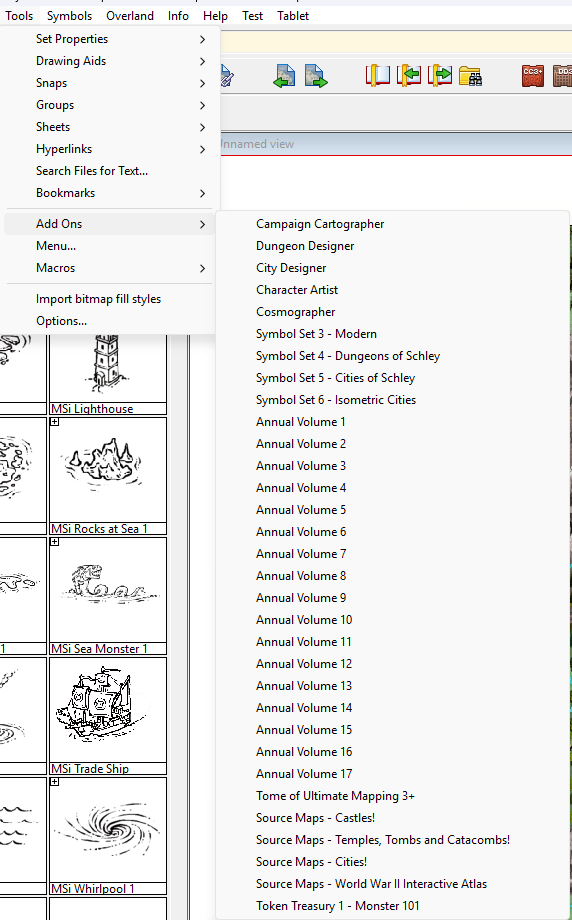
There are no icons for either SS1 or SS2.
This is because both these sets add additional styles to CC3+ and DD3 respectively. They are extensions rather than stand alone add ons.
EDIT: In addition to that information you could be forgiven for thinking that I don't have all the annuals. I appear to be missing Annual Volume 18 and 19 (this year's annual), but that is probably because I have installed all the monthly issues and not the full end of year installer.
There is a second Token Treasury, but I've never needed it so it's not currently installed.

Answers
Hi Zov :)
This is perfectly normal, as you can see from my list.
There are no icons for either SS1 or SS2.
This is because both these sets add additional styles to CC3+ and DD3 respectively. They are extensions rather than stand alone add ons.
EDIT: In addition to that information you could be forgiven for thinking that I don't have all the annuals. I appear to be missing Annual Volume 18 and 19 (this year's annual), but that is probably because I have installed all the monthly issues and not the full end of year installer.
There is a second Token Treasury, but I've never needed it so it's not currently installed.
Thanks Loopysue!
Glad to know there is no issues.
Since I picked up the Humble Bundle thing how does one go about getting future (including this years since my bundle did not include it - just up to 2023 it appears) Annuals?
You can purchase the annuals either through the selling pages here, or by picking them from the list of Offers when you log into your registration page.
If you buy the current year's annual it will not yet have been compiled into a single download, so you will have all the separate installers - one for each month.
Thank you again Loopysue!
You're welcome :)