

IDEA: Terrain over cutout rivers
 Royal Scribe
🖼️ 388 images Mapmaker
Royal Scribe
🖼️ 388 images Mapmaker
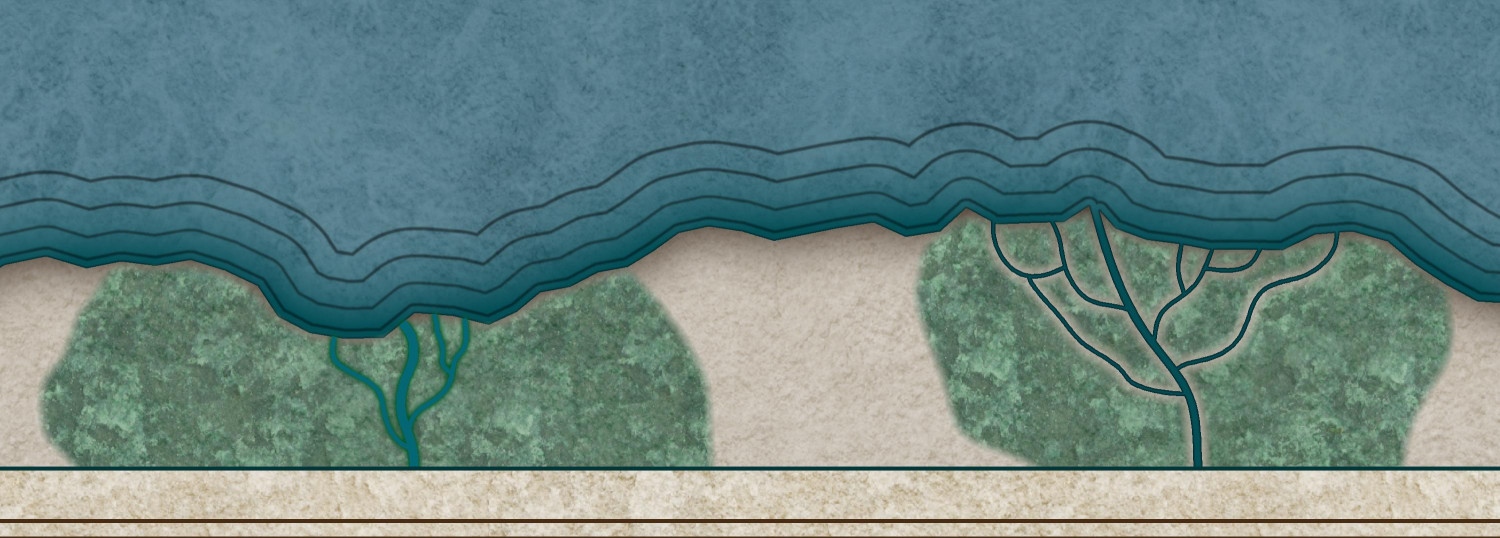
On Ralf's 2025 Ancient Realms Revisited tutorial this morning, there was discussion about using the Color Key rivers tool (where a magenta river is placed on the LAND sheet, cutting through the land to reveal the sea below). It was mentioned that the terrain sheets have to go over the land, and that means that you have to draw terrain around the rivers or using the regular rivers fill instead of the cutout.
I tried to do an experiment. On the left, I drew blue rivers over a swampy terrain. Not bad, but you do have to connect it properly to the coast for it to look right. But then on the right, I tried a different approach. I used the Color Key Cutout rivers on the land. Then I drew a swamp over it. Then I added the COLOR KEY effect to the LAND FEATURES (SWAMP) sheet (moving it to be the first effect), and then copied my magenta rivers to that sheet as well.
Both work well but I really like how the river pops in the swamp on the right. Quenten's CC4 wishlist idea in the chat of allowing color cutouts to cut through multiple sheets is a great idea, but in the meantime, copying the cutout to multiple sheets seems to work well.







Comments
What a great work around - thanks @Royal Scribe
Another alternative I've used in the past is to have the land as the background with all the terrain on top of that, and then add the water - a bit like a city map, but overland. I call it "sea over land". I think Darklands Overland is done that way. Birdseye Continental is definitely done that way. Oceans and rivers are drawn on the same sheet. A Color Key is used to cut island continents out of a rectangular map-covering ocean, and regular non-Color Key rivers drawn on top of the land and terrain on the same sheet.
However, when you are revisiting an oder style it's best not to make major changes when the older style was originally what I call "land over sea". It's too confusing for new mappers.
I have just tried Royal Scribe's method - and it works beautifully.