


Wyvern
Wyvern
About
- Username
- Wyvern
- Joined
- Visits
- 3,238
- Last Active
- Roles
- Member
- Points
- 5,515
- Rank
- Cartographer
- Badges
- 24
Latest Images



-
Any Oriental style symbol sets out there? (CC3+)
Regarding the free monthly content, there's a new page on the PF website about this here. I'm not sure you can access it from any of the PF website links currently, but it was given on Ralf's recent blog posting about the new Orcish symbols.
From that new webpage:
This content is available as a separate download from your registration page (click the CC3+ downloads button to see it) and will be rolled into the full CC3+ setup and upgdates regularly.
It does seem that only the current month's set is available as a download directly (just July's content is available from my own registration page today, certainly), but I assume that downloading the full CC3+ package would include June's symbols now. That might become problematic if you forget to download the set one month, but perhaps it's smart enough to realise if you haven't yet downloaded a given month's set after the month ends?
If you've not found anything suitable for cherry blossom trees in an overland mapping style from Sue's suggestions, you might need to try a search for icons or mapping icons online to find something suitable in PNG format (or that you could convert to PNG, so you get a transparent background for the artwork), and either use that, or convert it into a CC3+ symbol using CC3+. A couple of quick Google searches using "oriental tree mapping icons" and "cherry blossom mapping icons" came up with quite a number of artwork options, certainly (all vector artwork, however, and often not in PNG format, but I was only doing a very quick chase-round!).
-
Can the "C" = corner option be added to the drawing tool options list?
Thanks for that. It was while watching Ralf having to add multiple clicks to get corners on a drawing tool smooth poly I was prompted to ask, but it's something I've run into repeatedly too when adding a smooth poly outside the map border to ensure the edge effects are properly hidden by the screen. Be nice to have a full set of such options with the smooth poly drawing tools, certainly.

-
Community Atlas: Errynor - Aak and the Aak Hills
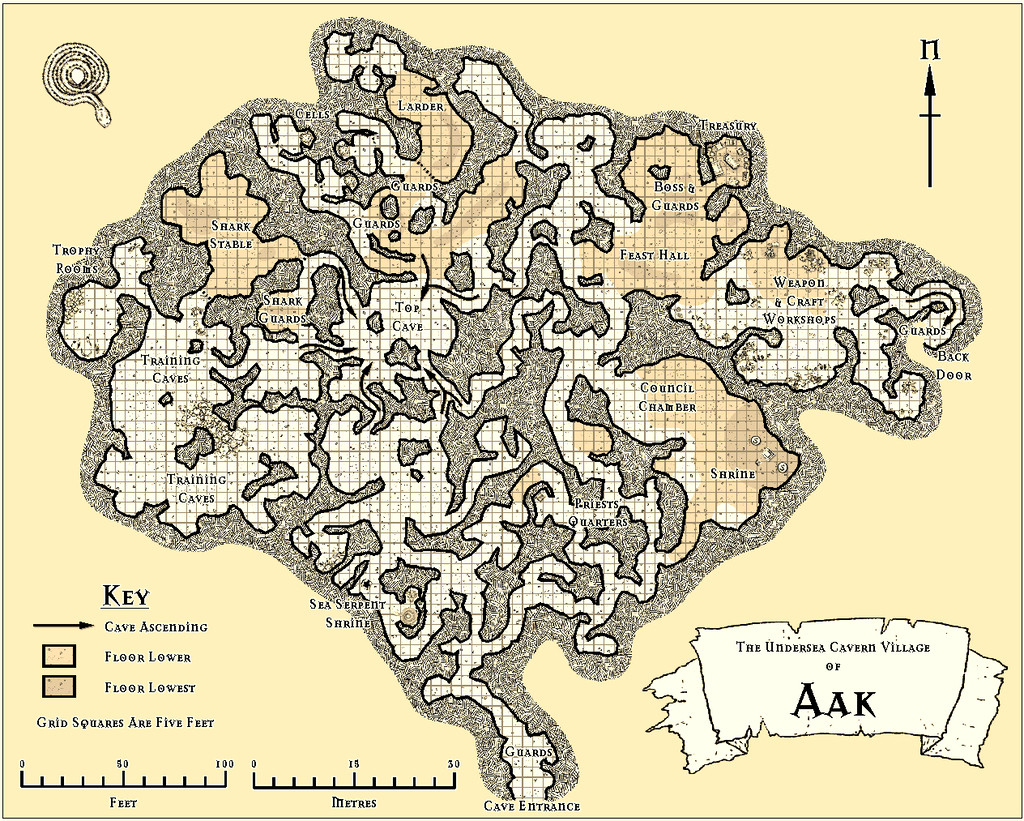
Having spent so much time concentrating on detailing the tiny unsubmerged areas of Errynor Map 01, it seemed about time I plunged down and started providing some sample maps detailing equally parts of the deep ocean's bed. I thought I would start with the Sea Orc/Ketorka cavern village of Aak, and so drew-up that map:
When I began preparing the notes to accompany it however, I realised I needed a second map to show some of the places across the nearby area as well. Thus was born the Aak Hills map:

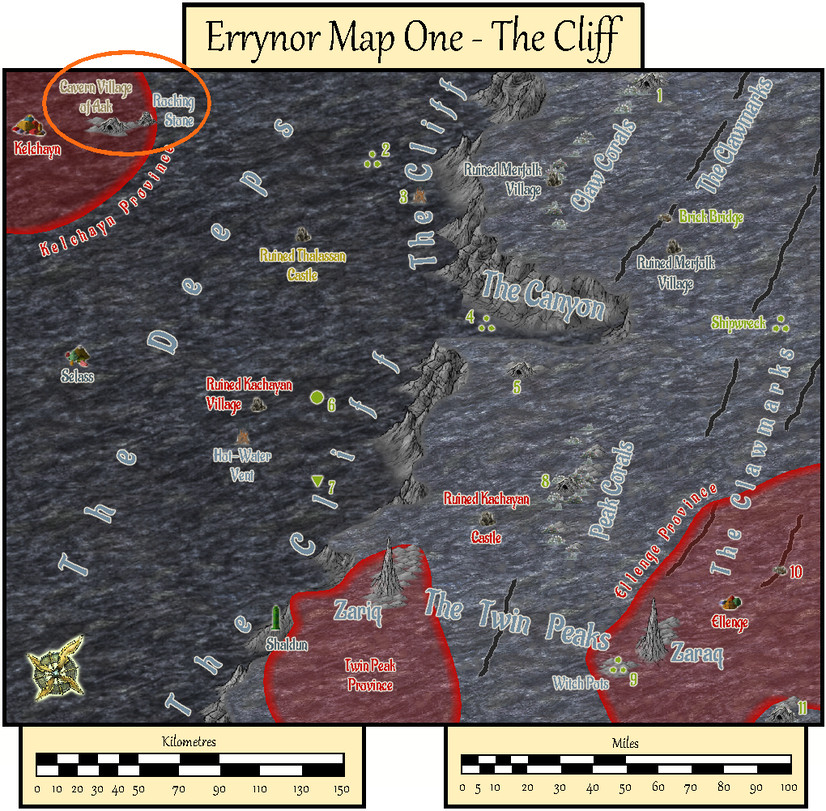
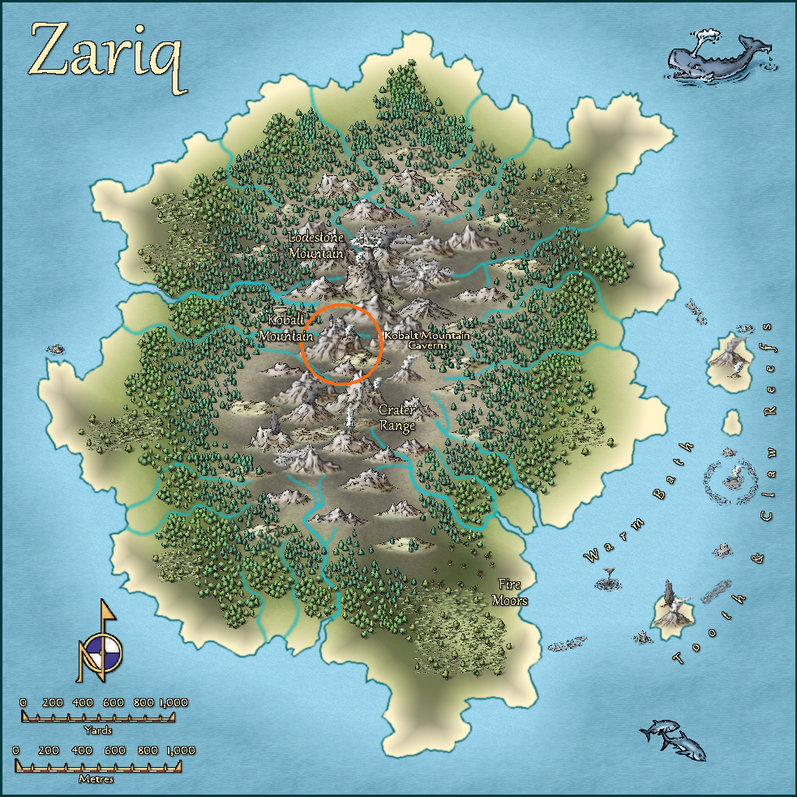
For orientation, this next map is Errynor Map 01 - The Cliff, showing the seafloor view, with the Aak Hills area ringed in orange:
In terms of the layout designs, the Aak village map originated as another of those Curufea's Random Cave Map Generator website plans I'd used previously for the Kobalt Mountain Caverns on Zariq. As before the chosen suitable layout was dropped-in as the bitmap base for the CC3+ drawing, rotated, amended and added-to in places as required. The map was constructed by hand-tracing over this using the TJ Vandel's OSR Dungeons style from the 2015 Cartographer's Annual, labelled with the Mason Serif Alt Bold font that comes with CC3+. I wanted a more or less black-and-white style as a reminder this setting is in the deep ocean, where there's no daylight, and most vision will be purely monochromatic.
The Aak Hills map was a straightforward adaptation from the pictorial version in The Cliff map, now in close-up. However, its contents beyond the previously-mapped elements were randomly allocated using a variant of my own tables and system that were used to generate the original Errynor base maps' features.
I thought for this map it would be interesting to experiment with the only CC3+ style package designed for mapping seafloor areas, Marine Maps from the 2017 CA. This though is intended for mapping small, near-coastal areas only, so some adaptation and improvisation was needed. Basically, I inverted the usual contour colour scheme in Marine Maps, where dark blue shows the coastal shallows, with white reserved for the deeper places only. On the Aak Hills map, dark blue is used for the normal deep ocean floor level, with increasingly paler blue to white contours (several levels of these, just like in Marine Maps) showing progressively higher areas above that floor. With almost 12,000 feet, 3,660 metres, of seawater above even the highest peak shown, by no stretch of the imagination can even these higher white places be classed as "shallows"!
The Marine Maps symbols were repurposed, sometimes with minor additions, and like the Arial font labelling, this created a few problems as I'd added Sheet Effect glows to make things stand out more. The Marine Maps style uses very few Effects overall. What happened? Well, where the Effect-amended black symbols and text lay over the equally black contour lines, those contour lines showed through as breaks in the text letters and symbols. This was, as ever (for me anyway; not my first encounter with this!), easily overcome by simply copying the affected symbols and text onto another Sheet above their original one, but which had no Effects added to it.
After some brief experimentation, I decided to place the anchor "north" pointer and the scale bars on Sheets without Effects, as I found them too distracting otherwise. This "vanilla" appearance is how such labelling would appear using the Marine Maps package ordinarily.
Of course, I had to try out the automated contour-labelling option in Marine Maps as well, where I was delighted to find ANY text could be typed-in per label, not merely numerals. Thus I was able to label the contours clearly in both feet and metres without needing to resort to adding a map key.




-
Community Atlas: Errynor - The Isle of Zaraq
Having tackled its nominal twin Isle of Zariq, it seemed reasonable to follow-up with the other seamount-tip Isle of Zaraq next, set amid the Frigid or Equine Ocean, about 620 km (385 miles) off the northwestern coast of Alarius.
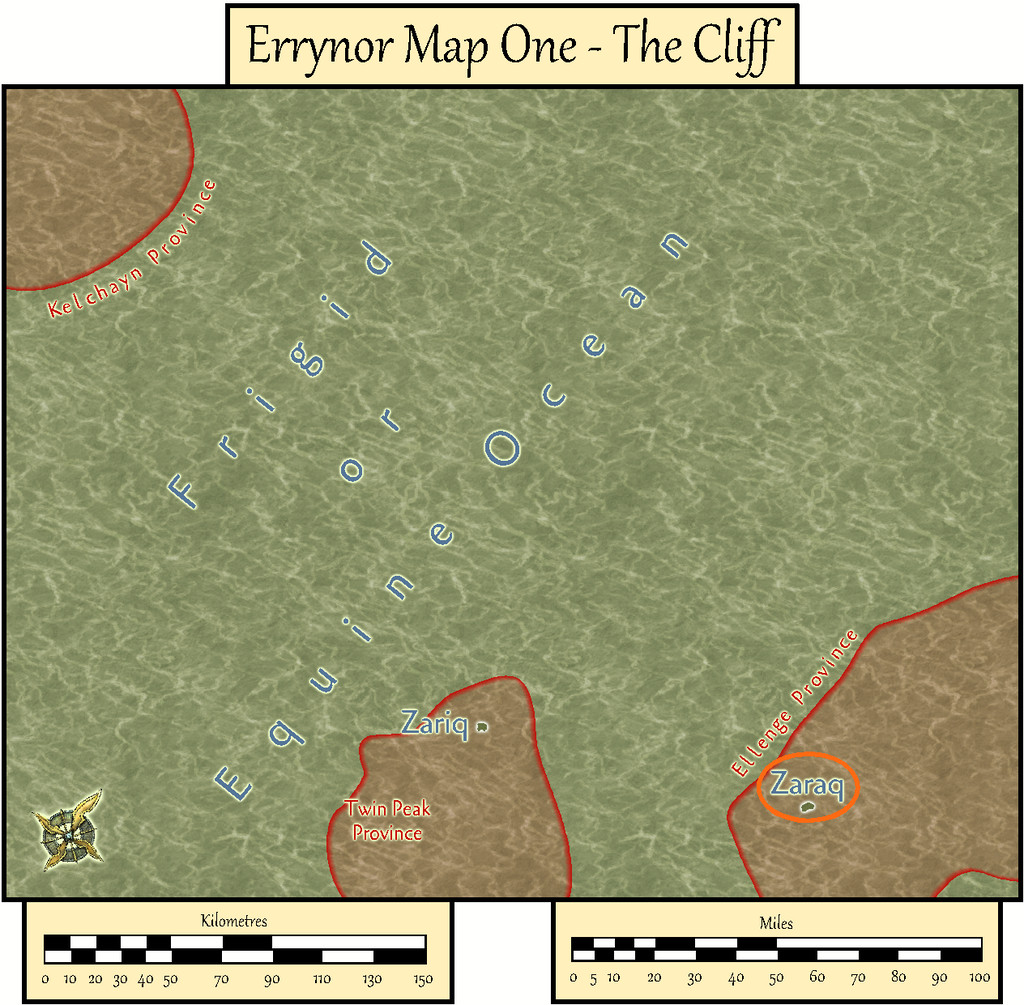
As with Zariq, I based Zaraq's appearance on another randomly-generated island from the Red Blob Games website, altered where necessary to suit what was needed here.
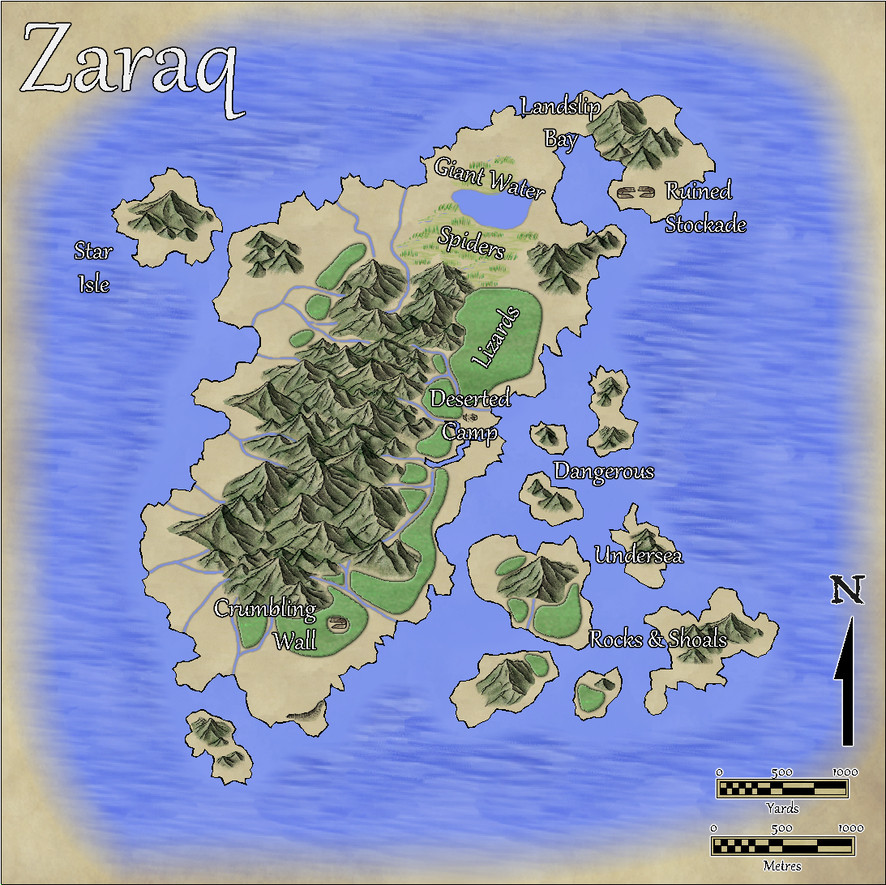
Originally, I'd thought of reusing the Mike Schley overland style from the Zariq map, and reworking that map as the base template for this one. However, part of my reason for participating in the Community Atlas project was to experiment and explore different mapping styles. So this time, I went with the Volcanic Islands style from CA88 for April 2014 instead.
Indeed, I'd intended to use this style for the more volcanically-active Zariq map, till I discovered it doesn't have any actual volcanoes in it! My vision for Zaraq was with a longitudinal volcanic fissure or crustal weak line along the island's N-S long axis, which would only occasionally produce significant fresh lava, more commonly just giving frequent minor earthquakes, small eruptions, or exhalations of smoke and gas.
There were a couple of false starts. This island, like Zariq, is tiny, at about 5¼ km (3¼ miles) long, with "peaks" just 60 m (200 ft) high, so scaling the mountains to look right as sharp-featured hills needed some experimenting. Once that was sorted, the map overall was completed in a fraction the time the Zariq one had needed, largely thanks to the simpler vegetation tools in the Volcanic Islands pack.
That extra mountains-as-hills work had its advantages though, as the look of the symbols reminded me a little of the conchoidal fractures shown by the volcanic glass obsidian, so Zaraq and some of its surrounding islets became endowed with scattered obsidian deposits. These are especially common on Star Isle, which glitters even from a distance, when the sunlight hits it just right!
Apart from the usual wealth of invertebrates, most of the island's inhabitants are seabirds, chiefly when breeding. There are some nasty little lizards with a poisonous bite too, notably in the more northerly of the dense, low-growing, thorny "forests" of the main island, along with some still more venomous giant water spiders that lurk among the marshes surrounding the solitary freshwater lake further north, creatures whose range extends into the northern fringes of the forest cover and across Landslip Bay - they can raft over water using surface tension.
Landslip Bay is the only sort-of safe anchorage for ships, where the best shingle landing beaches lie under the looming cliffs along its eastern shore - hence the name, and remembering the "earthquakes" motif... For some extra spice, there are three deserted structures on the main island's eastern flank, whose natures are noted in the map's accompanying PDF and text-file descriptions. The inhabitants and structures were determined by random rolls using an old set of island generating tables, slightly modified, from the Judges Guild tome, "Island Book One" published in 1978, incidentally.
As for why the structures are deserted, well, the perceptive may recall there was a "Deep-Sea Hag" symbol shown in the lower right corner of Errynor Map 01, which might be related. We'll be coming back to her again, especially towards the end of this set of maps...
![[Deleted User]](https://secure.gravatar.com/avatar/c75d9a245b74d9c59be0999ea81ca541/?default=https%3A%2F%2Fvanillicon.com%2F92add7f8c954488718110edc4896ad39_200.png&rating=g&size=200)

-
Community Atlas: Isle of Zariq - Kobalt Mountain Caverns
This map details the subterranean lair of the blue-scaled Kobalt tribe - essentially D&D's Kobolds - in the central uplands of the Isle of Zariq.
As commonly with my Community Atlas mapping, I opted for a random aspect, here regarding the layout of the caverns, which came from the Curufea's Random Cave Map Generator website. This online system creates its maps from electronic versions of tiles from the huge array of those drawn some years ago by artist Ed Bourelle of SkeletonKey Games (DriveThru RPG link). I like SkeletonKey's earlier tiles, as they have an appealing clarity, and allow the construction of more varied layouts and settings in a consistent style than just about any other set of printable tiles I've come across. The Curufea system shows you exactly which tiles from which set have been used should you need to rebuild the layout as actual printed tiles, plus the PDF images in the original files can be copied and pasted into other programs to set up a GM's map showing precisely what the final layout will look like. In my pre-CC days, this was a real boon!
For this map, I decided to try some large-area random options, and saved one of those that looked especially promising for what I needed.
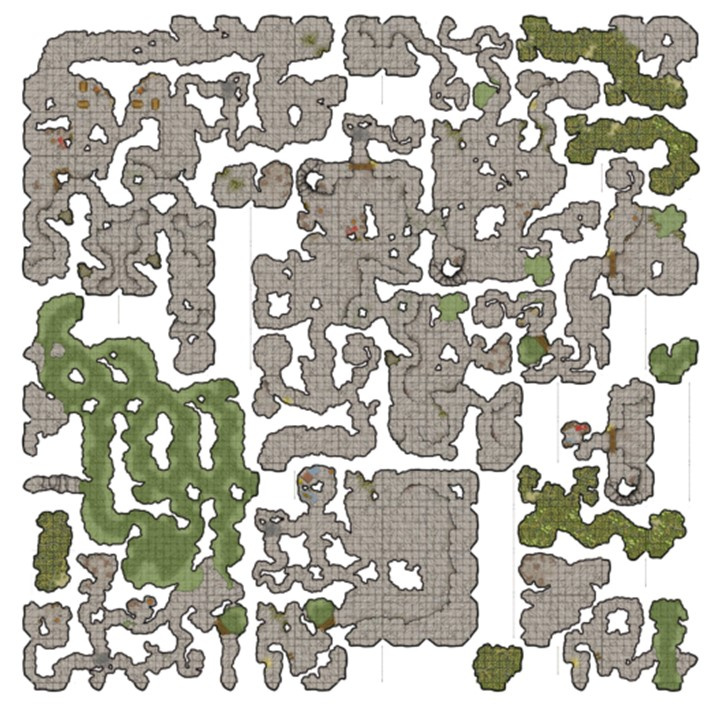
Of course, this random map ends up square, while the nature of the tiles means there will be several unconnected segments shown for almost all such layouts. However, by importing this base drawing into the CC3+ template, making several copies of it, rotated and moved around so different segments could be married up in the final version, something closer to what was required was achieved.
The map was always going to be quite complex. Having had a long fascination with kobolds, albeit initially in the form of the British folkloric mining goblins, I've been pleased to see how D&D's miniature draconic humanoid versions have developed under the system's 5th edition, with elements of those folkloric creatures incorporated. In particular, my ideas for this map were heavily influenced by the discussion and kobold lair map in Volo's Guide to Monsters (Wizards of the Coast, 2016, pp. 63-71). So there were to be wriggling, winding tunnels, sometimes crossing each other without linking at different vertical levels below ground, chambers with various functions, and many traps.
As another part of my Community Atlas mapping efforts has been to explore different styles, I opted for the Modern Cave Mapping style from the Caves and Caverns issue of the Cartographer's Annual, CA7 from 2007. Which allowed the creation of the map:
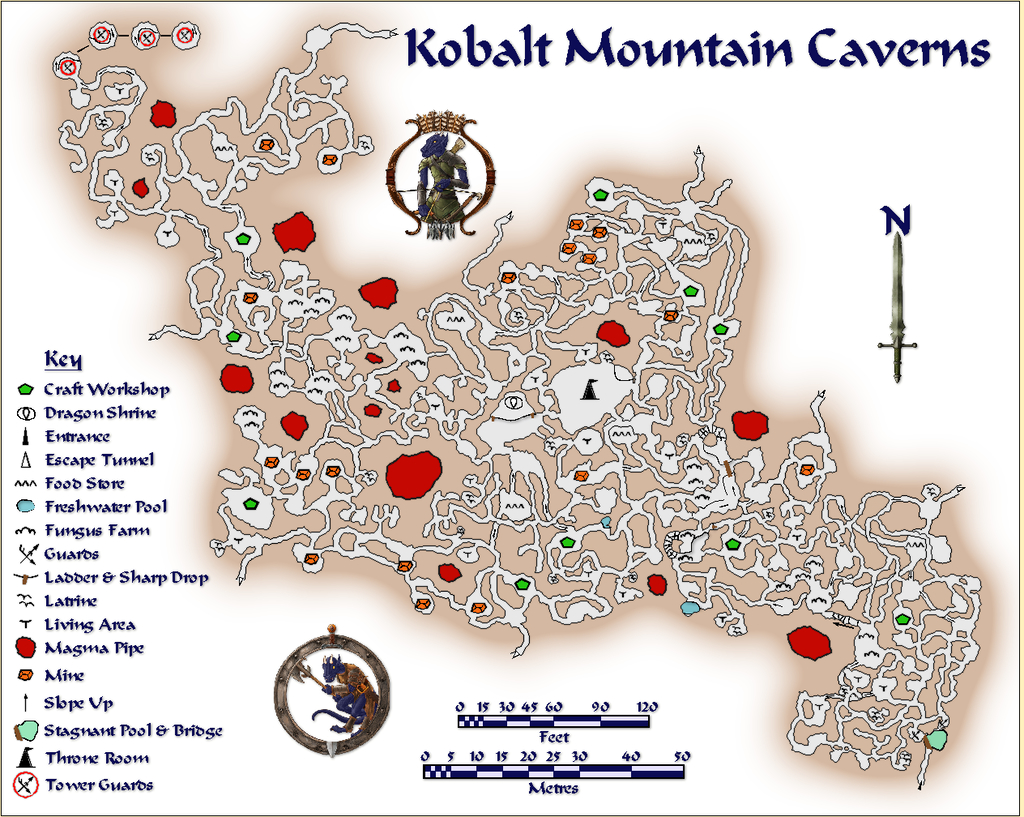
The layout was scaled and designed to fit to the locations on the Zariq map, as far as such things can be when translating pictorial side-view symbols into physical areas on a top-down plan. Consequently, the whole should be seen as sloping up gradually, if somewhat inconsistently, from the SE (lower right) to NW (upper left). The SE segment, where the entrance is, is set mostly below the "hill" symbol on Zariq, while the bulk of the Caverns lie beneath the "mountain", so the "tower" shown on the mountainside equates with the multi-level rounded cave fitted with a sloping spiral ramp inside at the top left of this map, where the "Tower Guards" symbols are.
While some of the usual Modern Cave Effects were tweaked or changed in places to better suit here, the light brown glow effect for the solid rock was left at its normal level. On a more typical map size, this would make it fade away in the larger enclosed rock areas, and at a shorter relative distance from the outer walls. However, it seemed to work better left like this to me, as it helps to emphasize the narrowness of the tunnels and smallness of the caves. Similarly, the Key labelling was deliberately scaled as larger than necessary to continue that impression. Kobalts are only about a yard/metre tall, and their tunnelling naturally matches their stature. Adding a couple of varicolor Token Treasury symbols made sure nobody might be mistaken about the nature of Kobalts!
The composite method of constructing the final layout where sometimes tiny patches of floor texture had to be added to link passageways, together with larger areas of passage and cave floors to create the illusion of under- and overlying cavern sections, meant the usual method of adding a grid - by copying the entire floor only onto the Hex/Square Grid Layer, and converting the floor fill to a suitably-sized grid - wouldn't work. Or rather it would, but the grid became inconsistent, sometimes with overlaps, across the entire map. After several tries to create a single polygon from these disparate segments, I was still unable to get the whole to work together properly, so opted to cut my losses and simply hand-drew the entire grid instead:

Yes, it's a three-foot grid. I found a five-foot grid was too difficult to read in the passageways especially, so after a very brief experiment, changed it. As that's a yard, it could be easily restated as a metre-grid instead, though for precision, that's actually closer to 0.9 metres, of course. Well, that was my excuse for not drawing a metric grid as well (that's a h*ll of a lot of lines to draw and trim to entity once...). I did though add the two scales to help in estimating greater distances.
Then I added the traps:
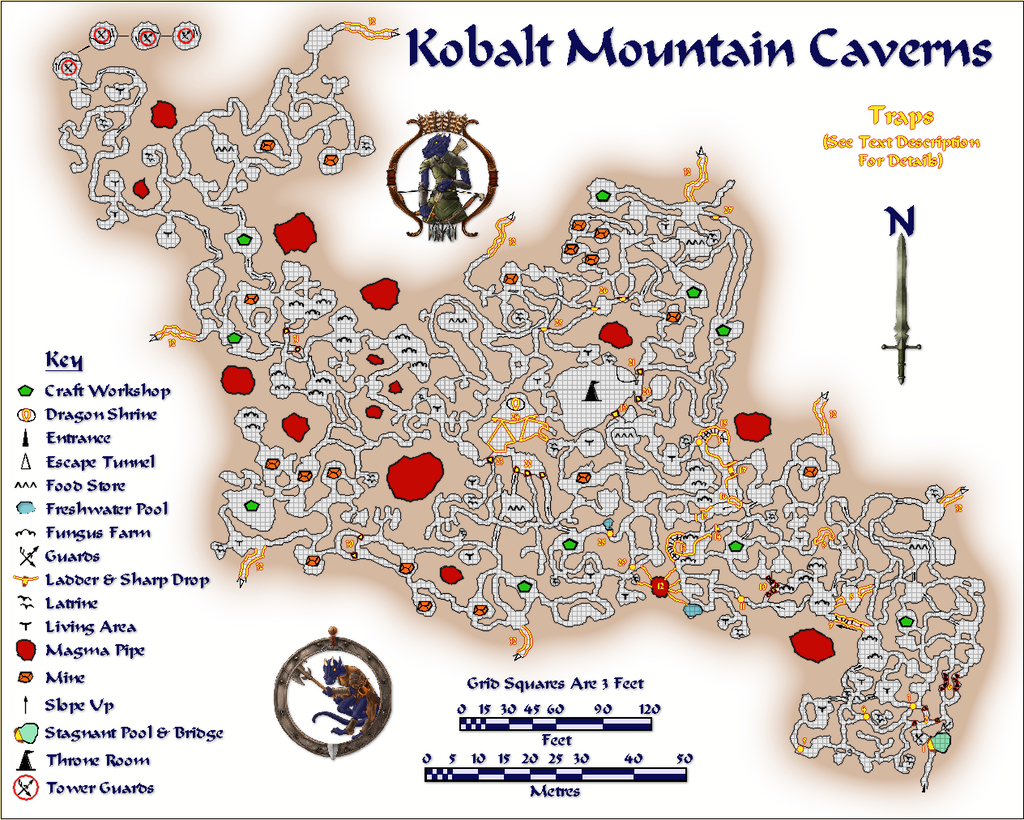
These were allocated a numerical key whose description, with other details on the Kobalts and their lair, are included in the map's accompanying PDF and text files for the Atlas. The idea is that both the grid and traps will be accessible using toggles in the final Atlas map.
Should you spot a similarity between this map's style and that used for "The Hive" maps I entered for Lorelei's Mapping for Dice competition a year ago, that's partly because they are the same; and yes, my choice for those Hive maps was heavily influenced by having worked on this map some weeks earlier!



