


Wyvern
Wyvern
About
- Username
- Wyvern
- Joined
- Visits
- 3,240
- Last Active
- Roles
- Member
- Points
- 5,519
- Rank
- Cartographer
- Badges
- 24
Latest Images



-
Sinister Sewers - Style Development Thread (CA207)
Not a map as such, but the cast terrain company Dwarven Forge do a range of sewer pieces for their "Cities" models, which might provide some pseudo-medieval style inspiration. This link is to their main, fully hand-painted, set, and this is the main image for it:
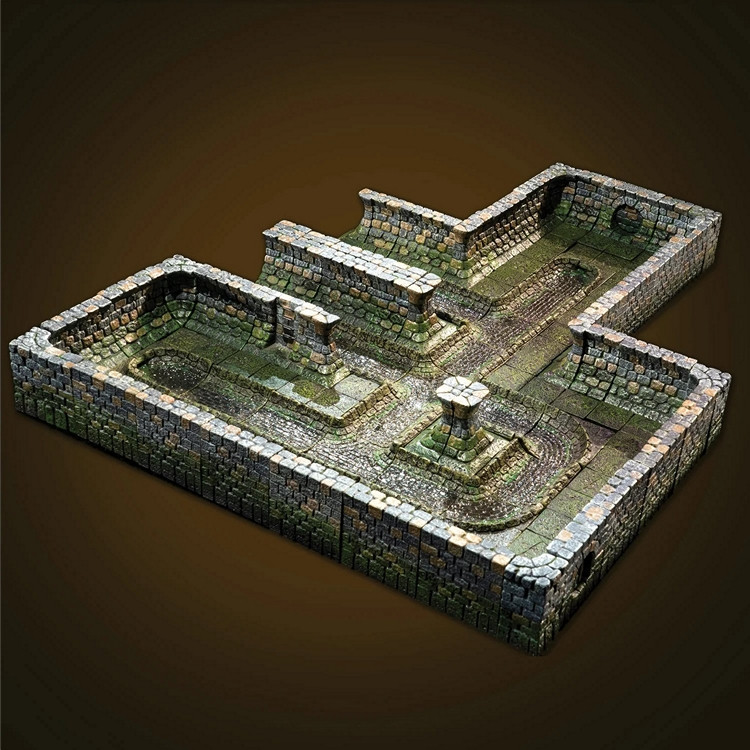
For ideas on what sewers can sometimes look like, you might care to watch the latter stages of the 1949 movie "The Third Man", or dig through the nearly 100 images relating to it on the IMDb site here, if unfamiliar. Many of the sewer shots were from actual locations under post-war Vienna, although some (notably those with Orson Welles - where you can actually see it's him, as many of his shots were done by a double) were mocked-up/recreated in the studios later.


-
How Do I Create a Hatch Style Fill?
If I copy the file into the CC3Plus/Hatch Styles folder, I can see the file name. However, when I try to create a new tool with it, the program crashes.
It's possible the file may be too complex to be used as a hatch style, as the ones I've been using recently (from CA20) have all been very basic, just a few simple polygons at most. But I really have no other ideas right now; sorry!
-
How Do I Create a Hatch Style Fill?
You should be able to create a new drawing tool using your hatch style by taking one of the existing ones that uses a hatch style (for ease), and saving it as "New", using whatever name you prefer.
You'll need to set up the hatch style though NOT in the "Properties" section, but in the "Outline" one, as an "Extra entity", clicking the "Properties" button. Under the "Hatch style" list in the "Custom tool properties" pane this "Properties" button opens, you'll need to scroll through the list to find your hatch style, and then click it. Then OK everything, save the new tool, and test it out.
Hopefully, that'll do it! If not, I'm sure one of our resident experts will leap to your aid - good luck!
-
How Do I Create a Hatch Style Fill?
You might also try a search on the Forum here for "Hatch style", as there have been a few folks who've previously created their own, and some of the information brought up that way might be useful.
However, I didn't find any obvious file complexity limitations mentioned, so it might be something less obvious, maybe something as odd as the length or nature of the filename, or some extra "invisible" entities in your drawing. Given the Hatch Styles are all just ordinary, if small, FCW drawings though, I'm unsure what else might be happening in this case.

-
Layering the Same Fill without pitting in Worthington Historical
Checking this Annual issue following Julian's query, there are further oddities about it.
Creating a new map file for a test drawing, I found there are no effects on either of the mountains sheets in a new file (the sheets set-up is to have the TERRAIN HILLS one immediately below TERRAIN HILLS 2, and TERRAIN MOUNTAINS below TERRAIN MOUNTAINS 2). When I copy those effects over directly from the Scotland map, and draw using the mountain drawing tool, I get pitting on the TERRAIN MOUNTAINS 2 sheet, just as Julian says. However, if I try drawing a new area on on the TERRAIN MOUNTAINS 2 sheet of the sample Scotland map using the default tool, that ALSO shows pits, unless I keep the area small and simple!
Both the TERRAIN HILLS sheets do come with their Glow effects emplaced in a new file, but there's no pitting with them. I wonder though if that may be because the default hills drawing tool uses only the Solid 10 bitmap fill, rather than anything textured. The default mountain tools both use the Land Brown CA91 fill.
-
I'm hungry for your lore!
Two places I haven't seen mentioned here yet are Chaosium's Glorantha (which has so much lore it's effectively a real place for many who RPG there; plus avoid all those silly mapping projection problems in a world which is on the upper face (only) of a cube!), and of course out own Community Atlas world of Nibirum. Not everyone provides detailed descriptions for their maps there, but some do (I've been adapting bits and pieces from my own nearly 50 years of RPGing to what I've added there, for instance), and even without that, those maps are always worth exploring.


-
More a request...
Well, I did already tinker together a few symbols for overland undersea use like this, which are available as part of the Atlas download pack. You can see some of them in-use on my deep sea-bed Errynor Map One - The Cliff map in the Atlas. If you dig around among the other seafloor maps from that one, you'll see I carried out a few more experiments with home-made undersea symbols, and the reuse of non-undersea symbols as undersea ones too!
I have to say too, that making new vector symbols for this kind of mapping is far easier than making bitmap ones 😁!
-
Live Mapping: Frontier Town
I seem to remember one old west town painted mostly red... [Clint Eastwood movie reference 😉🤠🏜️]
-
Heraldry Resources for Campaign Cartographer
Might be worth saying that this is a free-to-access resource as well (perhaps add it to the Free Symbols & Artwork topic @Monsen?).
It would be interesting to know how it complements the existing Heraldic Symbols pack from the March 2008 Cartographer's Annual too.
-
Live Mapping: Hex Maps
There are certainly some tricks to getting the best from this style, and a few oddities about it. I explored some of these last year. I do like the overall look of the style though - so straightforward and clear (though that may be the hex-board wargamer in me, as much as the role-player).
