

How to Merge Roads CC3+ Pro

I want to merge these two 5" roads on a 100x100 map, but I can't figure out how to do it. I'm still relatively new to CC3+ Pro and am still trying to learn a lot more of the advanced methods.
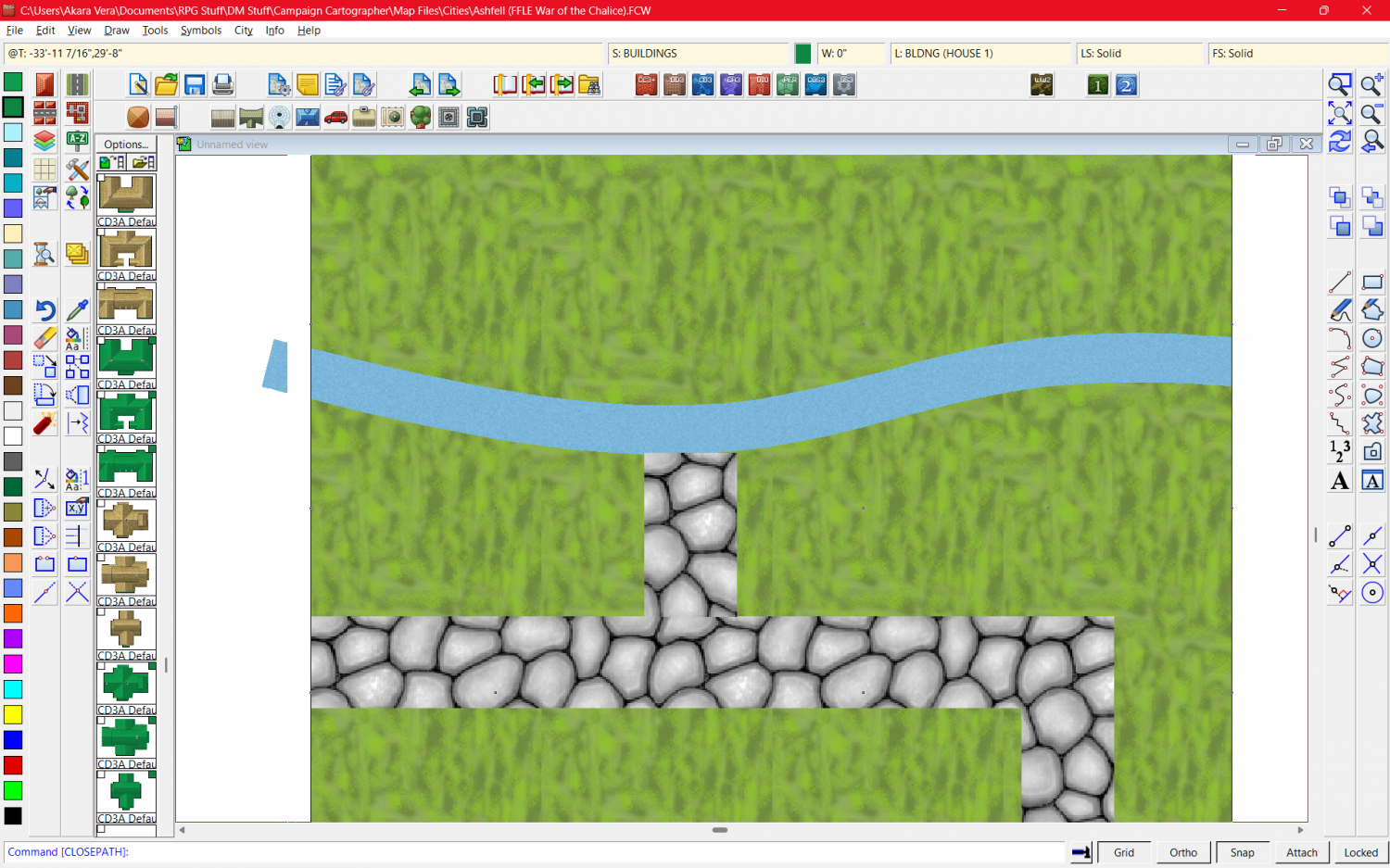
I want to merge these two 5" roads on a 100x100 map, but I can't figure out how to do it. I'm still relatively new to CC3+ Pro and am still trying to learn a lot more of the advanced methods.
Answers
Hi :)
Roads drawn as lines can't be joined. Most of the time that's ok because the cobbles are small enough that you can't really see where the texture joins. In your example, however, the cobbles are quite huge and the misalignment in the texture between the two roads is easily visible.
Click the box in the Status Bar (along the top) where you can see FS:..., and pick the Bitmap Fills tab, and the Cobble Bitmap from the Fill Style Name: dropdown.
Check that the Scaled box is checked, and that you have a reasonable scale set in the Width and Height text boxes. You can set those numbers to anything you like, but remember that they represent metres in a metric map, and feet in an imperial map, and dictate the size of the area that one patch of that texture should cover.
...
If you want the cobble scale as large as you have it in your screen shot, and you really need the roads to match, you might have to draw the shape of them as a polygon with zero line width, instead of a line with a road width. That solution is ok in a dungeon map or a very tiny village map, but in a city map that would be unrealistically labour-costly.
Thank you, this has helped a lot. I've been trying it out to determine the best scales and methods of use and it has worked well for the village.
What would you recommend for roads in a city map?
I would say that with that texture in particular it's very much a matter of taste and should be set on a per-map basis. Adjust at will. That's the beauty of having the freedom to change it - you can make it any scale you like.