

Strange Artifacts in Lighted Bezel Function
 Ithril
Traveler
Ithril
Traveler
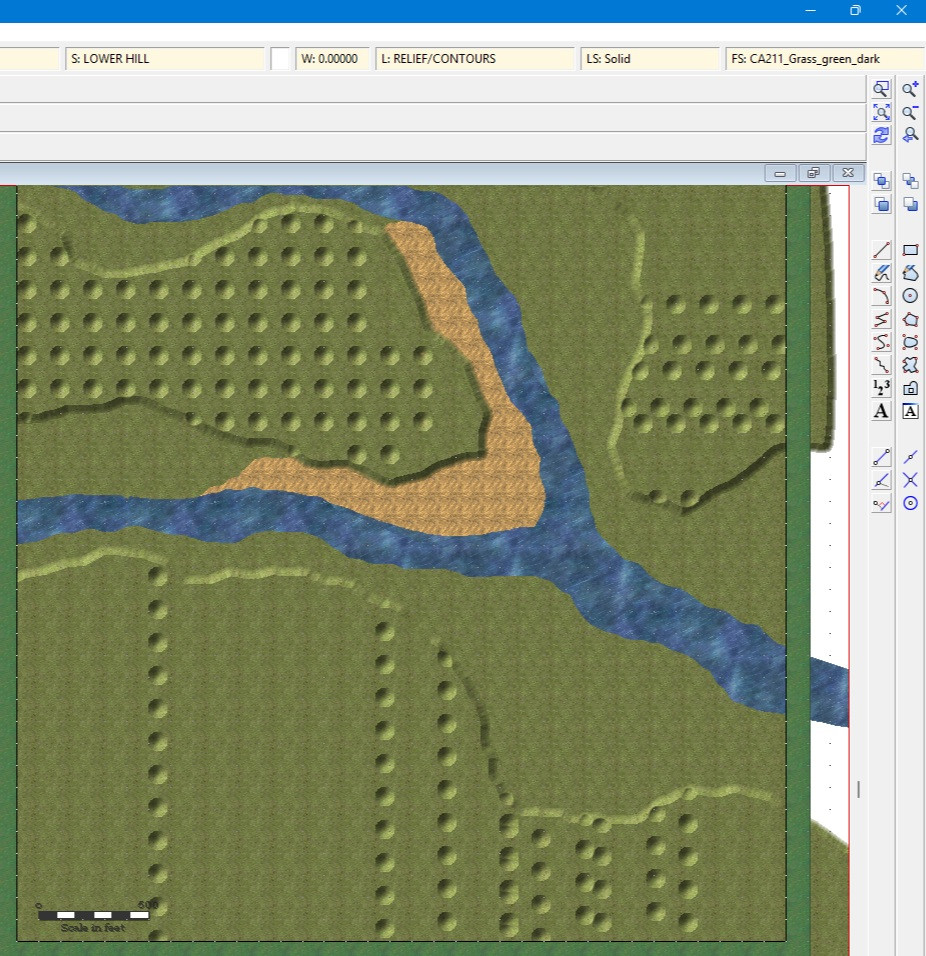
I'm using the 2024 Watabou Cities revised template, and I'm getting strange artifacts in the lighted bezel effect. I did edit the effect with the following parameters: Bevel Size: 50, Intensity: 20, Smoothing: 2 units. I also changed the original 20% gray fill to the CA211_Grass_Green_Dark fill to better match the background.
I'm getting a weird inconsistent golfball texture. It changes with magnification. If I zoom in very close, the texture overlaps, causing a pretty interesting semi-random 'smooth hilly' effect. How can I eliminate this?
I
Comments
That's Transparency Acne. It happens when you use very similar or the same texuture on two different sheets, and the upper one has a Bevel, Bevel, Lighted, Glow or Edge Fade, Inner sheet effect.
There are a number of ways to remedy this.
Thank You Loopysue, for your help with this file.
I really appreciate the help and suggestions you made, and I'll have to keep this marked to remember if I have any trouble with it again. It may also help with some other maps I was having problems with before, so I will have to revisit those to see if this helps them as well.
I
You're welcome, Ithril :)