

[WIP] Cymril City
 Calibre
🖼️ 39 images Mapmaker
Calibre
🖼️ 39 images Mapmaker
Hey all,
Here's what I've been working on. I've tabled my original fantasy world RPG for my gaming group due to, hmmm, personal issues. These issues had choked out any sort of inspiration for mapping---until I decided to just use Talislanta. Easier on me and I enjoy re-creating the maps from the game. So, well, working on this:
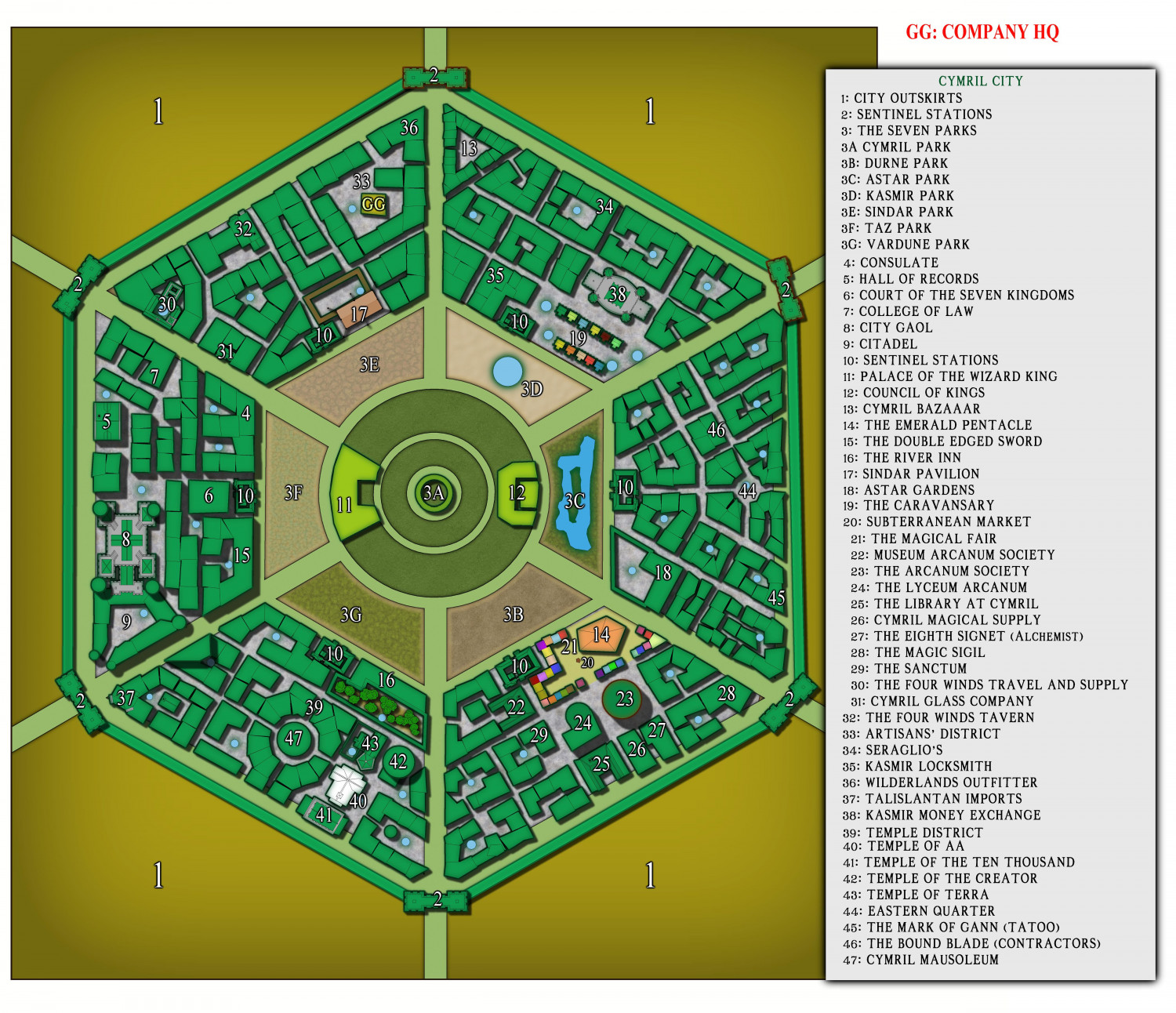
This is the original map out of the game source book which is my version. There was no scale included. But in my VTT, I've made the walls 900' each. I excluded the gargantuan farmlands outside the city to keep the 'busy' look down somewhat. This city is supposed to be huge: the center of civilization in the western part of the continent; but it's not reading that way to me. I'm suspecting a redo is the near future. Advice is welcome, please.
Cal









 and 1 other.
Comments
I'm not familiar with Talislanta or this city, but the few other maps of Cymril I've found online suggest either following a more detailed view of the various internal city blocks (the official map, I think), or a more abstract view, a little like the Watabou technique for showing city blocks, rather than the loose mix of both you have here. Obviously, I don't know what significance the more detailed areas you've shown may have in your own campaign, but I do wonder if this mix is what's not helping you retain the impression of the vastness of the city. Possibly adding some vegetation within and/or without the city - trees especially - might help give a different impression of scale too?
However, what you have now seems pretty impressive in its own right, and also seems to be doing its job well - identifying what's where clearly within the city.
Thanks for the advice, indeed. However, I'm fairly sure I don't understand what you mean 😁. I'd like a 'more detailed view', I believe, but am not sure how to achieve this. I've been rewatching over and over again, Ralf's, 'New City Style' videos to try and capture a look that somehow will convey the vastness of this city, yet not become too busy. I definitely will take style suggestions, please heh.
Cal
The official Cymril City cloth map images I've found online show individual building roofs in every single block in the city, often broken up by narrower streets and alleyways within each block; there are even a couple of what look like small parks (with a few trees & bushes), and there seems to be an inner ring with a wall and towers in the gap your map has between the angular ring of "3"-labelled areas and the next ring inwards (where you have features 11 and 12). The official map retains its angular format right to the centre though, and I'm not certain if you were wanting your own amended version of the map, or something closer to this "official" one.
The highest-res version of the cloth map I came across in a quick search is on the Studio 2 Publishing webstore page here (best to open the map image in a new tab to be able to view and zoom into it properly), and that, with its use of colouring, shading, textures and features seems to work both as a zoomed-out overall map, and zoomed-in for better detail. Even so, I'm not sure it looks especially vast, though that may be partly the road widths and tree sizes shown outside the city, which all seem over-scale to me.
Not sure this will help you get any further, but maybe other folks having the chance to view the higher-res official map might come up with some more workable/comprehensible suggestions!
Wyvern, thank you for this.
Again, no scale is given. I don't understand why 'would-be' cartographers would refuse to place a scale. :D
Perhaps that's the answer in-and-of-itself.
What style would you use to replicate this? Probably one of your own :)
Cal
There are really two elements to the scale issue. One is the appearance of the city rooftops, roads and vegetation. On the cloth map, the roofs seem fine, as do most of the internal routes, but when the roads leave the city, they seem too broad to me to give an impression that the city is really huge, something the oddly large size of the individual trees beyond the city wall rather reinforces. That may be because the trees are equally gigantic, of course, and the roads similarly are eight-lane highways (albeit with snake-like bends, and dusty surfaces!).
However, the shadows on the city wall and some internal features are very long, whereas the trees and external features have no shadows at all, so maybe the countryside depiction is simply meant as an artistic impression, and isn't meant to be as real as the city.
As to why no actual scale was provided, like you, I have no answer for that! It would seem a very obvious omission.
For the style, when working with a pre-published map, I long found I had a tendency to try too hard to replicate that, without having the necessary freehand drawing skills to do so, a tendency I learnt to overcome eventually (mostly...), given that route merely leads to frustration.
As the official map uses a mix of straightforward roof outlines with simple shading for pitched roofs and domes, with some textured roofs, mostly, though not entirely, without features such as chimneys, it may be that just using the basic options available in CD3 (the Bitmap and Vector symbols, coupled especially with the House drawing tool), and suitable colour variations to mimic something of that official-map look, might be sufficient. Or you could start with something quite simple, such as CA166 Serpentine City, and import other roof/house drawing textures from other city drawing packs as required. That's really more of a decision only you can make though!